
We've added member activities. It's experimental, and we've tried to keep the UX clear, but the intention is pretty simple: help you safely meet other folk with similar interests.
It's also meant for people you already know. Fancy a cycle this week but nobody can agree on a time? Post it, let people vote on slots, and skip the usual DM ping-pong ("I'm free at 10", "how about 2?", "can't do Tuesday"). Same idea if you're trying to meet someone new nearby.
Post from your activity feed or the Post an activity page. There's a help icon in the composer if you want the full activity guide.
Two ways to post
Pick whichever fits:
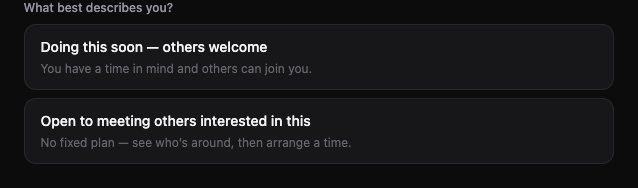
Doing this soon, others welcome. You've got a rough time in mind and want company. Set when (today, tomorrow, this weekend, next week, or a specific time), pick a meeting point, and say how many people can join.
Open to meeting others interested in this. No fixed plan yet. Stays on your profile until you turn it off. When you're ready to actually meet, post a follow-up with a time.
If you're hosting something regular, start a group instead. That's a better fit for recurring meetups and proper events.
Who can see and join
Under Who can join?:
- Anyone: shows on Discover, the feed, and the members map. Anyone signed in can join.
- Only people you follow: not listed publicly. Only people you follow can join. You can still share the link if you want someone to view it.
Anyone with the link can view an activity. The setting controls who can join.
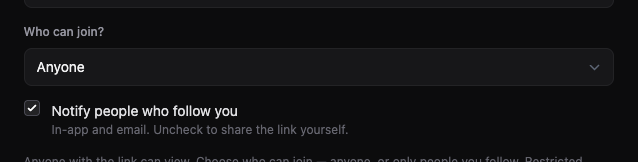
You can notify people when you post (email and in-app). Public activities ping your followers. Restricted ones ping people you follow.
Time voting
If you're not sure on the exact hour, pick a preset like Tomorrow or This weekend instead of locking in a time straight away:

Radius suggests a few slots. People who join tap what works for them. You confirm the final time when you're ready. The most popular slot gets highlighted.

Already know when you're meeting? Choose Pick a time and skip voting.
Finding people and staying safe
Follow people from their profile and you'll see their public activities in your feed. Discover and the members map surface public stuff from people nearby. Open to meet posts sit on your profile so others can see you're interested, even without a set time.
Meet in public places. Pick a cafe or park, not a home address. Only the general area shows until someone joins.
Try it
Open your feed, tap Share what you're up to, and give it a go. Step-by-step help is in Posting an activity.
As always, very open to feedback. If anything isn't clear or could be improved, drop us a line at hello@radius.to or use our feedback form.