Adding and Removing Organisers
Share group management with other members. Add organisers; the group owner cannot be removed.
Groups on Radius can have multiple organisers. You can add existing members as organisers so they can create events, manage members, and edit settings with you. You can also remove organiser access when needed, except for the group owner.
Overview
Organisers can do everything needed to run the group: create and edit events, manage the member list, send invitations, update group settings, and more. Adding more organisers helps share the workload and keeps your community running when you're busy.
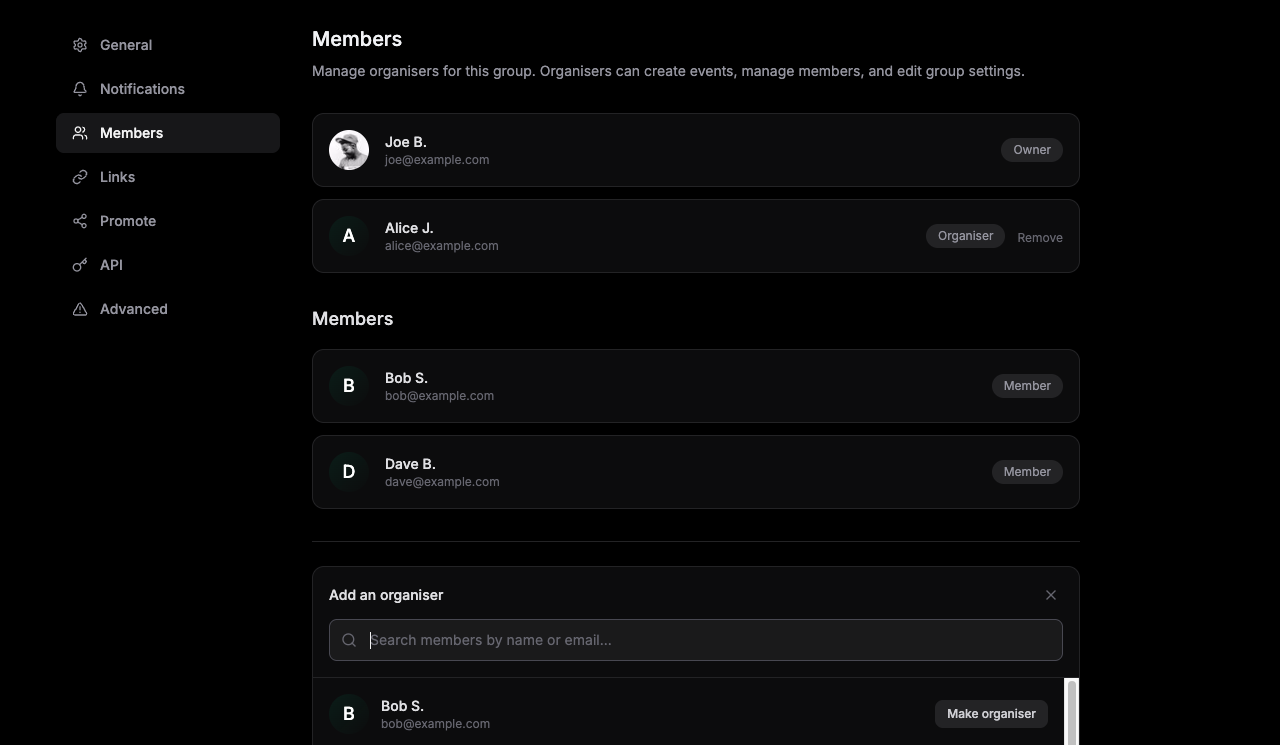
Adding organisers
Only current organisers can add new organisers. You can only promote people who are already members of your group.
Free groups can have up to 2 organisers. Pro groups can add 3 or more.
- 1Go to your group page and open the group menu (or click your group name)
- 2Select
Settings - 3Open the Members tab
- 4Click Add organiser and pick a member from the list (or search by name or email). Click
Make organisernext to their name.
Note: The list only shows people who are already members of your group. New organisers receive an email and an in-app notification when they're added.
Removing organisers
If someone no longer needs organiser access, any organiser can remove them. The member stays in the group but loses the ability to create events, manage members, or change settings.
- 1Go to group Settings → Members
- 2Find the organiser in the list and click
Remove(this option is only shown for organisers who are not the group owner).
Important: You cannot remove the group owner. See the section below.
About the group owner
Every group has one owner: the person who created the group (the first organiser). The owner is shown with an "Owner" badge in the Members tab. They have the same permissions as other organisers but cannot be removed as an organiser by anyone.
If the owner no longer wants to run the group, they can leave the group themselves (which may affect ownership or the group's visibility depending on your setup). The "Remove" action is intentionally not available for the owner so that the group always has a clear primary contact.
Tip: When adding organisers, choose people you trust. They'll be able to manage events and members just like you.